The Bill Nobody Budgets For: What an AI Agent Really Costs
An AI agent can resend its growing context at every step, turning a cheap model call into an expensive loop. This production guide shows how to estimate the real cost, set hard spending caps, control retries, and measure cost per successful task.
The Bill Nobody Budgets For: What an AI Agent Really Costs
Forty thousand dollars. One engineer. One month.
Vitaly Gordon, CEO of Faros AI, told TechCrunch that a CTO had seen one engineer spend that much on tokens. The CTO did not know whether to stop the engineer or ask the rest of the team to work the same way.
That uncertainty is the problem.
The invoice showed the spend. It did not show whether the company received $4,000, $40,000, or $400,000 in value.
The same TechCrunch report said Uber used its full 2026 AI coding budget by April and Microsoft withdrew Claude Code licenses from developers after enabling them months earlier.
Axios reported another, much less verifiable example. An AI consultant said an unnamed client spent half a billion dollars in one month after failing to set employee usage limits. The company was not identified, and Axios did not independently disclose its bill. Treat it as a reported anecdote, not a confirmed benchmark.
The amounts are extreme. The mechanism behind them is ordinary.
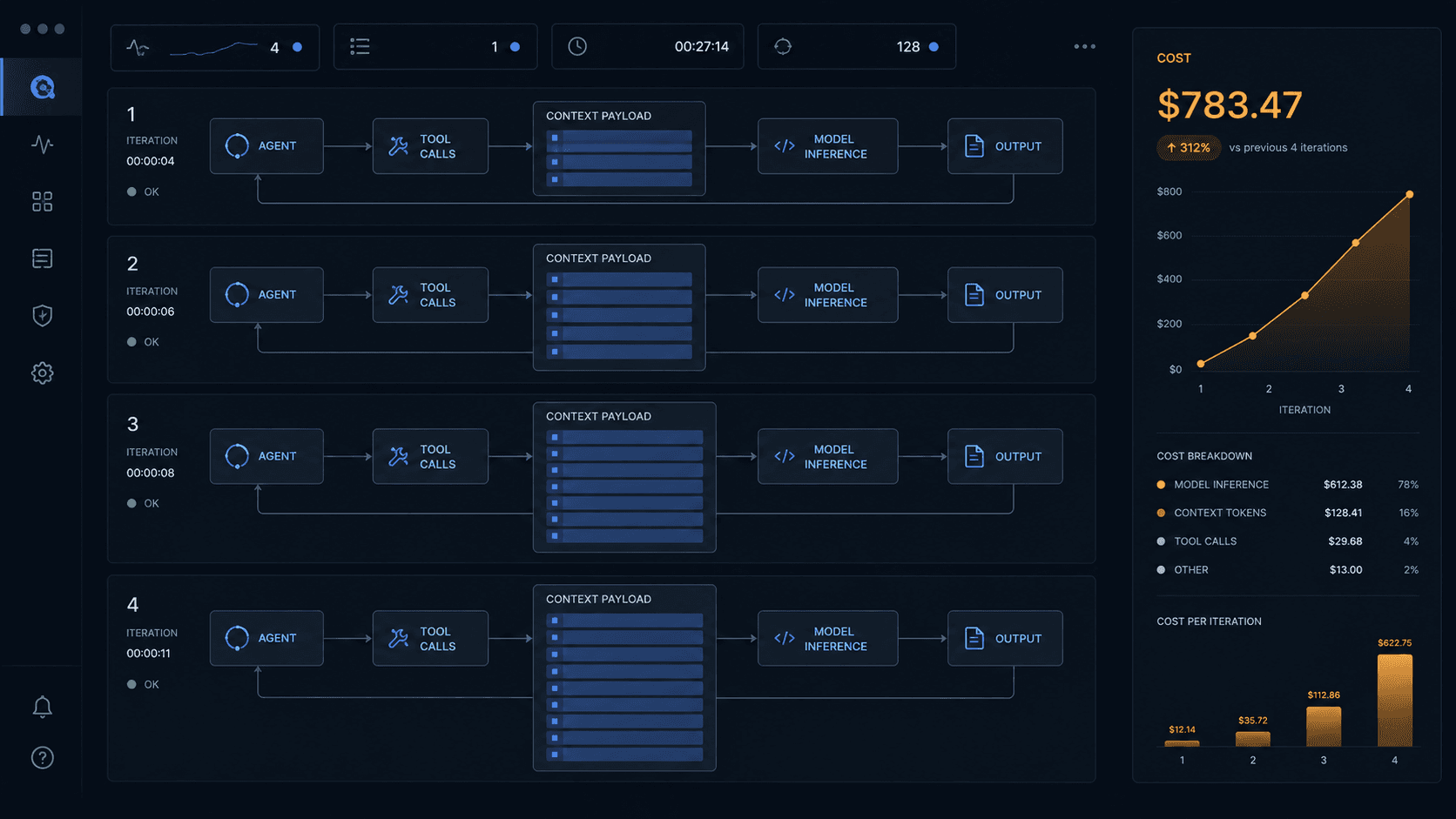
A chat sends once. An agent loops.
A basic chat request might send:
- the system instructions;
- one user question;
- a small amount of supporting context.
The model returns an answer, and the request ends.
An agent may do something very different:
- Read a file.
- Choose a tool.
- Send the tool result back to the model.
- Edit the file.
- Send the growing history again.
- Run a test.
- Send the output again.
- Inspect the failure and retry.
Each call can include the system prompt, tool definitions, earlier messages, previous model output, file content, and tool results. Anthropic's context-window documentation confirms that system instructions, messages, tool results, images, documents, and tool definitions all count toward the request context.
The agent is not paying only for the latest instruction. It may be paying to carry the history needed for the next decision.

Why the cost can curve upward
Suppose an agent starts each call with b fixed input tokens. These include the system prompt and tool schemas.
Every completed step adds another d tokens to the history. After n steps, an uncached full-history loop processes approximately:
Total input tokens ≈ n × b + d × n × (n - 1) / 2
The first term grows in a line. The second grows with the square of the step count.
Consider an illustrative run with:
- 5,000 fixed tokens;
- 2,000 new history tokens per step;
- 40 model steps.
If someone prices every step like the first one, they estimate:
40 × 7,000 = 280,000 input tokens
The growing-history estimate is:
(40 × 5,000) + (2,000 × 40 × 39 / 2)
= 1,760,000 input tokens
That is about 6.3 times the naive estimate, before counting output tokens, retries, tool fees, or parallel agents.
This is not a universal multiplier. Some systems use server-managed state, prompt caching, history compaction, or fixed context windows. Those controls can reduce the bill. The formula shows the exposure when a loop repeatedly sends an expanding history without effective caching or compaction.
Model pricing is not the final bill
The model cost for one step is roughly:
Step cost =
uncached input tokens × input rate
+ cache-write tokens × cache-write rate
+ cache-read tokens × cache-read rate
+ output tokens × output rate
+ tool and infrastructure charges
The cost of the full run is the sum of every step, including failed attempts.
Your production estimate should account for:
- repeated system prompts and tool schemas;
- files and tool results added to the history;
- model output and reasoning tokens;
- automatic and application retries;
- web searches, code sandboxes, browsers, and paid APIs;
- parallel branches and subagents;
- embeddings, retrieval, storage, and reranking;
- evaluation and observability calls;
- runs that stop without producing a useful result.
The last item is easy to miss. A failed $2 run is not cheaper than a successful $3 run if the company still needs a person to complete the task.

Caching helps, but it does not remove the need for limits
Stable context is a good candidate for prompt caching. System instructions, tool definitions, reference documents, and unchanged prefixes may not need full-price processing on every step.
Anthropic's prompt-caching documentation separates normal input, cache creation, and cache-read tokens. Its pricing documentation says a cache hit costs a fraction of the standard input price.
Caching changes the price of repeated context. It does not make that context disappear.
Cached tokens still count toward the context window. Cache entries can expire or become invalid. Newly added tool output remains billable, and a long agent can still spend heavily on generation, tools, retries, and uncached content.
Track these values separately:
- uncached input tokens;
- cache-write tokens;
- cache-read tokens;
- output tokens;
- cache hit rate;
- cost saved through caching.
A high cache hit rate with a rising total bill is possible. It means the workload is growing faster than the discount is helping.
Price the agent before building it
Start with the business task, not the model's token price.
Write down:
- The value of one successful result.
- The maximum acceptable cost per success.
- The expected number of steps.
- The worst allowed number of steps.
- The files and tools each step may add.
- The acceptable failure and retry rate.
- The human approval points.
Then estimate three cases:
Case
Purpose
What to include
Typical
Operating forecast
Median steps, normal context, usual tool calls
Heavy
Capacity planning
Large files, high step count, several retries
Maximum
Safety boundary
Every enforced limit reached at once
If the maximum run can spend more than the result is worth, lower the limits or redesign the workflow.
Do not rely on the average. Runaway incidents live in the tail, so p95 and p99 cost matter more than a reassuring mean.
Put a budget inside every run
Provider-level monthly limits are useful backstops. They are too broad to manage one customer, one job, or one faulty loop.
Every agent run needs its own budget object. This example is only a starting point:
run_budget:
max_cost_usd: 2.00
max_model_steps: 12
max_total_input_tokens: 250000
max_total_output_tokens: 30000
max_tool_calls: 20
max_parallel_branches: 2
max_retries_per_step: 1
max_wall_time_seconds: 600
on_limit: pause_for_approval
Tune those numbers to the task. A support reply and a contract review should not share one budget.
Before each model or tool call:
- Count or estimate the next input.
- Add the maximum allowed output.
- Add any tool fee.
- Compare the upper-bound cost with the remaining run budget.
- Continue, downgrade, summarize, ask for approval, or stop.
Anthropic provides a token-counting endpoint for estimating message inputs before a request. The final count can differ slightly, so keep a safety margin.
The budget check belongs in application code. A prompt that says "do not spend too much" is not a financial control.
Use two stop lines
A production agent should have a soft limit and a hard limit.
At the soft limit, the system can:
- switch to a cheaper model;
- summarize old context;
- remove low-value tool results;
- stop parallel branches;
- ask the user to approve more spend.
At the hard limit, the run stops. It should return its current work, explain why it paused, and preserve enough state for a person to continue safely.
The provider account also needs an organization or workspace limit. Anthropic documents both monthly spend limits and user-configurable workspace limits. Those limits pause requests after the threshold, but they protect the shared account, not the economics of an individual job.
Use both layers:
Per-run limit → protects the task
Workspace limit → protects the team
Organization limit → protects the company
Control the loop itself
The cheapest token is often the one you never send.
Limit steps and tool calls
Set a maximum number of model turns, tool calls, and planning cycles. Count failed calls and retries against the same budget.
Bound retries
Retry only errors that may succeed on another attempt. Use exponential backoff and a low retry count. Never let two retry layers multiply each other silently.
If an SDK retries three times and your workflow also retries three times, one failed step may create far more calls than the application owner expects.
Trim tool output
Do not return an entire log, repository, database result, or webpage when the next step needs five lines. Filter, paginate, summarize, and preserve a reference to the original source.
Compact history deliberately
Keep current goals, decisions, constraints, unresolved errors, and source references. Summarize older conversation and discard duplicated output.
Compaction can lose information, so test it against tasks where earlier details matter. The answer is not "always summarize." It is "retain the smallest state that still supports the task."
Route simple work to cheaper models
Classification, formatting, extraction, and short summaries may not need the same model used for planning or difficult code changes. Route by task and fall back only when quality requires it.
Limit parallel agents
Parallelism reduces elapsed time by spending on several paths at once. Set a branch limit and cancel losing branches as soon as one path succeeds.
Put humans before expensive escalation
Ask for approval before the agent enters a high-cost phase, opens many files, creates several subagents, or switches to a more expensive model.
The approval screen should show the current spend, estimated additional cost, work completed, and reason for escalation.
Measure cost per outcome
Tokens are an input. The business buys outcomes.
Track each run with:
- estimated and final cost;
- model and tool cost by step;
- input, cache, and output token totals;
- loop depth and wall time;
- retry and failure counts;
- outcome status;
- human review time;
- customer, feature, and workflow owner;
- business value or accepted unit of work.
Build dashboards for:
- cost per successful task;
- cost per accepted code change or completed case;
- p50, p95, and p99 run cost;
- spend with no successful output;
- cost by model, tool, team, and customer;
- daily burn against the monthly budget;
- runs stopped by each limit;
- cache hit rate and context growth per step.
An expensive user may be highly productive. A cheap workflow may produce work nobody accepts. Cost controls should expose the tradeoff, not force every run toward the lowest possible price.
Roll out with financial canaries
Test agent economics before opening the workflow to a full team.
- Replay real tasks offline.
- Measure typical, heavy, and maximum runs.
- Run in shadow mode without taking final actions.
- Release to a small group with strict limits.
- Review cost and accepted output every day.
- Raise limits only when the extra spend produces measurable value.
- Keep a kill switch that stops active jobs and queued retries.

For internal coding agents, display each developer's current usage and cost. Uber later introduced a monthly cap per employee and per coding tool, with usage visible in an internal dashboard, according to TechCrunch.
Visibility does not replace enforcement, but it changes behavior before finance receives the invoice.
What to do when a run escapes
When spend rises unexpectedly:
- Stop the active run and its child jobs.
- Disable queued retries and scheduled continuations.
- Lower or revoke the affected workspace credentials.
- Preserve traces, request IDs, usage records, and tool logs.
- Identify every customer and workflow using the same configuration.
- Separate model, cache, tool, and infrastructure charges.
- Find the first step where context, retries, or branches diverged.
- Add the failure to the regression test set.
- Restore the workflow only after a hard limit blocks the same scenario.
Do not fix the invoice by deleting the logs. The trace is what tells you whether the agent got stuck, repeated work, received oversized tool output, or simply completed a valuable but expensive task.
Production checklist
- [ ] Every run has a hard dollar or credit limit.
- [ ] Steps, tools, retries, branches, output, and wall time are capped.
- [ ] The next call is priced before it is sent.
- [ ] Failed calls and retries count against the same budget.
- [ ] Context growth is measured at every step.
- [ ] Stable prefixes use caching where it is economical.
- [ ] Old context is compacted without losing required state.
- [ ] Simple tasks can route to cheaper models.
- [ ] Tool results are filtered before entering model context.
- [ ] Expensive escalation requires informed approval.
- [ ] Workspaces and organizations have enforced spend limits.
- [ ] Dashboards show cost per successful outcome.
- [ ] Alerts use p95, p99, and daily burn, not only monthly totals.
- [ ] Active jobs and retries can be stopped immediately.
Sources
- TechCrunch, The token bill comes due: Inside the industry scramble to manage AI's runaway costs
- Axios, AI sticker shock hits corporate America
- TechCrunch, Uber caps employee AI spending after blowing through budget in four months
- Anthropic documentation, context windows
- Anthropic documentation, token counting
- Anthropic documentation, prompt caching
- Anthropic documentation, pricing
- Anthropic documentation, rate and spend limits
- Anthropic documentation, managing Claude Code costs
Stay ahead of the curve
Join my private newsletter for exclusive insights, tools, and thoughts straight to your inbox. No spam, just value.