Your AI is not forgetting. Your context is rotting.
Giving AI more information does not always make it more accurate. As prompts grow, important facts can get buried. This guide explains context rot and shows how businesses can build AI systems that retrieve the right information at the right time.
Your AI is not forgetting. Your context is rotting.
Most businesses are approaching AI memory in the wrong way.
They upload every policy, every meeting transcript, every customer message, and every old document. Then they push all of it into the prompt and expect the AI to work everything out.
It feels logical. More information should produce a better answer.
The research says otherwise.
A large context window tells you how much information a model can accept. It does not tell you how well the model can use every piece of that information. As the input grows, relevant facts must compete with old, similar, or unrelated material. The answer may still sound confident and polished, but its reliability can fall.
This problem is called context rot. For a business, it can lead to the wrong policy being quoted, an outdated customer preference being used, or a support agent missing the one sentence that changes the correct decision.
The answer is not to stop giving AI context. It is to give it less context, selected more carefully.
What the research found
In 2023, researchers from Stanford, UC Berkeley, and Samaya AI published Lost in the Middle. They tested how language models use information inside long inputs.
The result was a U-shaped pattern. Models often performed best when the relevant information appeared near the beginning or the end of the prompt. Performance fell when the same information was placed in the middle. In one multi-document test, GPT-3.5 Turbo performed worse with the answer document buried in the middle than it did without any documents at all. The study also found that a model with a larger context window was not automatically better at using that context. (Liu et al., 2023)
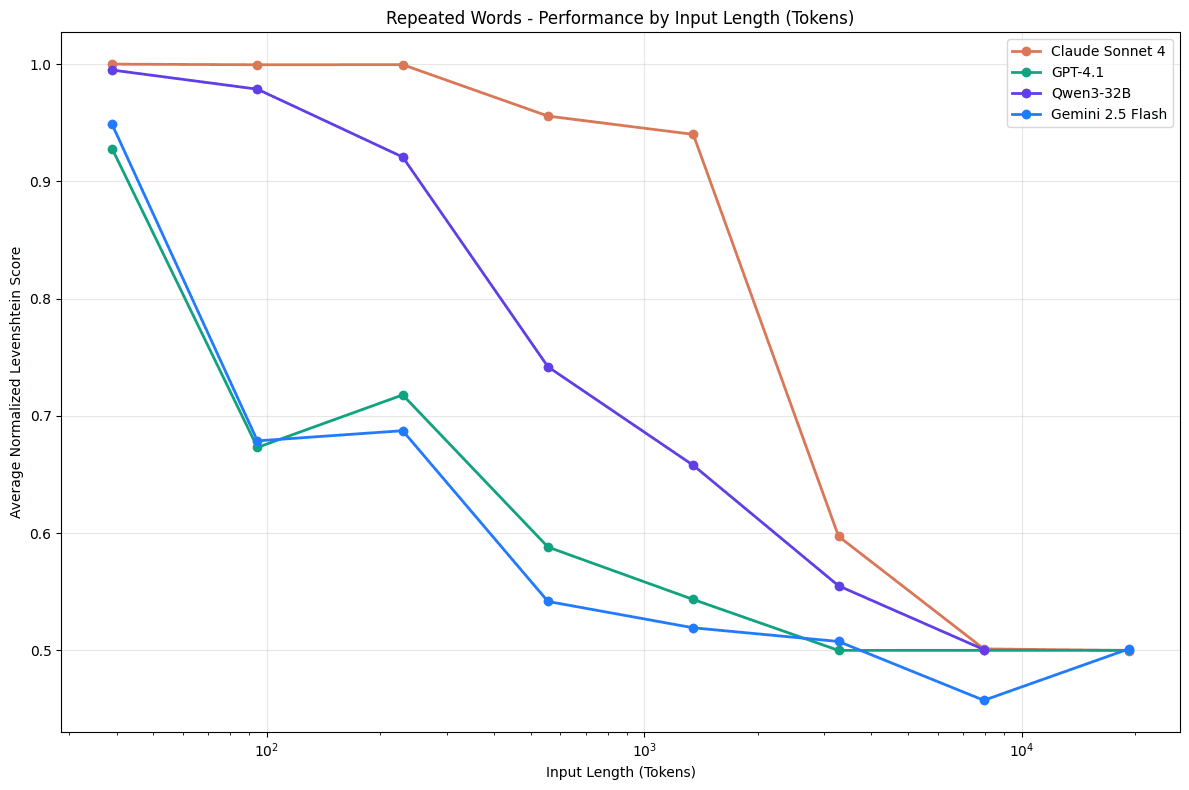
Chroma revisited the issue in 2025 with 18 newer models, including GPT-4.1, Claude 4, Gemini 2.5, and Qwen3 models. The team kept tasks simple and changed the input length. Performance became less reliable as the context grew. Related but incorrect information, which the report calls distractors, caused more damage than plainly irrelevant text. (Chroma, 2025)
The most useful test for businesses involved conversational memory. Chroma compared full chat histories averaging about 113,000 tokens with focused inputs averaging about 300 tokens. Every model family performed better with the focused version. Reasoning modes helped, but they did not remove the gap.
That is the part most business owners should pay attention to. A model may be able to read a complete customer history, but forcing it to search that history and reason about the current request in one step adds risk.
Why this becomes a business problem
Context rot rarely looks like a system crash. It usually produces an answer that is almost right.
Imagine a customer support assistant with three years of account history. A customer changed their delivery address last month, but the old address appears across several earlier messages. If the system sends the entire history to the model, the current fact is surrounded by repeated outdated facts. The model may choose the wrong one.
The same problem appears in other areas:
A sales assistant mixes an expired price with the current proposal.
An HR assistant applies an old policy after a new version has been approved.
A finance assistant uses a number from an earlier draft instead of the signed report.
A meeting assistant treats a rejected idea as the final decision.
A service agent misses an exception hidden inside a long customer record.
Adding more documents feels safer because nothing has been excluded. In practice, the system has transferred the filtering problem to the model.
That is an expensive design choice. Longer prompts increase processing costs and response time. More importantly, they make failures harder to predict. A workflow that succeeds during a clean demo can behave differently after months of conversations and uploaded files.
The focused context model
A reliable AI system should not treat its context window as a storage room. It should treat it as a workbench.
The storage room can be large. The workbench should hold only what the current task needs.
I recommend separating business knowledge into four layers:
1-Source records: Approved policies, contracts, product data, CRM records, and other original information. These remain outside the prompt until needed.
2-Structured state: Current facts that the system should not have to infer, such as account status, plan, approved price, owner, delivery address, and consent status.
3-Retrieved evidence: A small set of relevant passages selected for the current question.
4-Working context: The instructions, current request, structured state, and retrieved evidence sent to the model for this task.
This separation gives each piece of information a job. The model reasons over a focused package instead of searching an uncontrolled archive.
Seven practices that reduce context rot
1. Retrieve before you generate
Do not attach the full knowledge base to every request. Search it first, then pass the most relevant material to the model.
Retrieval should use more than semantic similarity. Filter by customer, department, document type, region, language, date, and permission before ranking the results. A passage can sound relevant while belonging to the wrong account or policy version.
For high-risk tasks, use a second ranking step to compare the candidate passages against the exact question. This removes near matches that could distract the model.
2. Set a context budget
Do not fill the prompt simply because the model allows it. Give every section a budget.
A customer service workflow might reserve space for the operating instructions, the current customer state, recent conversation turns, retrieved evidence, and the answer. When one section grows, the system should compress or remove lower-priority material instead of silently expanding the whole prompt.
The right budget depends on the task, so test it. The best input is the smallest package that contains enough evidence to answer correctly.
3. Keep current facts separate from history
History explains how you arrived at the present. It should not be the only place where the present is stored.
If a customer changes an address, plan, or preference, update a structured current-state record. Keep the old event in the history for audit purposes, but mark it as superseded. The model should receive the current state by default and retrieve the history only when the question requires it.
This prevents the AI from counting repeated old facts as stronger evidence than one recent fact.
4. Put evidence close to the task
The Lost in the Middle findings show that position can affect performance. Do not bury the question or the evidence inside a long prompt.
Use a clear order:
1.Role and operating rules
2.Current task
3.Current structured facts
4.Retrieved evidence
5.Required answer format
For sensitive decisions, repeat the short task immediately before the model responds. This is not a replacement for retrieval, but it reduces the chance that the main instruction disappears inside supporting material.
5. Summarize with receipts
Summaries can keep long conversations manageable, but a summary is another model-generated interpretation. If it drops a condition or changes a number, later answers inherit the mistake.
Keep the summary linked to the original records. Store important facts in structured fields, include dates, and preserve source references. When a claim affects money, access, compliance, or a customer commitment, the system should verify it against the source rather than trusting the summary alone.
6. Let the system say "I do not know"
Relevant-looking distractors can produce confident errors. The system needs an approved fallback when the evidence is missing or contradictory.
Require the model to separate supported facts from assumptions. Set a confidence rule. If the sources disagree, route the case to a person or ask the user a focused question. A short refusal is cheaper than a confident operational mistake.
7. Test the context, not only the model
Teams often compare models with one clean prompt. That misses the failure mode.
Build tests that vary:
the position of the correct fact,
the number of retrieved passages,
the presence of similar but wrong passages,
old and new versions of the same policy,
long conversation histories,
missing and conflicting evidence.
Track answer accuracy, citation accuracy, abstention quality, response time, and cost. Run the same test set whenever you change the model, retrieval method, prompt, chunk size, or memory logic.
A practical rollout for an existing business
You do not need to rebuild every AI workflow at once.
Start with one process where a wrong answer has a visible cost, such as customer support, proposal generation, onboarding, or internal policy questions.
During the first week, collect real questions and identify the source that should answer each one. Remove duplicate and obsolete documents. Add ownership, effective dates, version labels, and access rules.
Next, build a retrieval layer that returns a small set of passages. Show those sources beside the answer so an employee can check them. Store important live facts in structured fields instead of asking the model to infer them from chat history.
Then create a test set from real situations. Include easy questions, ambiguous questions, old information, and misleading near matches. Compare your current full-context approach with the focused approach. Keep the version that improves accuracy without creating unacceptable cost or delay.
Finally, monitor the system after launch. Retrieval quality changes as documents grow, policies change, and users ask new questions. Review incorrect answers and trace each failure to one of four places: the source data, retrieval, prompt construction, or model reasoning. Fix the failing layer rather than adding more context by default.
What happens if you ignore it
At first, probably nothing obvious. The assistant will work well on short conversations and clean documents.
Then the knowledge base grows. Customer histories become longer. Similar policies accumulate. The system starts making small mistakes, and the team responds by adding more instructions and more documents. That can make the original problem worse.
Eventually, employees stop trusting the tool. They check every answer manually, which removes the time savings the AI was meant to create.
The alternative is less dramatic and far more useful: build a system that knows where the truth lives, retrieves only what the task needs, and shows its evidence.
The real advantage is not a bigger window
Businesses will keep getting access to models with larger context windows. That is useful capacity, but it is not a memory strategy.
The companies that get reliable value from AI will manage context as carefully as they manage data. They will keep current facts clean, retrieve evidence for each task, test with distractors, and allow the system to pause when the answer is uncertain.
Your AI does not need to remember everything at once. It needs to find the right information at the right moment.
If your AI assistant becomes less reliable as its knowledge grows, I can help you audit the context, retrieval, and memory design behind it.
Sources
Kelly Hong, Anton Troynikov, and Jeff Huber, "Context Rot: How Increasing Input Tokens Impacts LLM Performance", Chroma, 2025.
Nelson F. Liu et al., "Lost in the Middle: How Language Models Use Long Contexts", 2023.
Stay ahead of the curve
Join my private newsletter for exclusive insights, tools, and thoughts straight to your inbox. No spam, just value.