Write the Tool Once: How MCP Connects Claude to Your Database
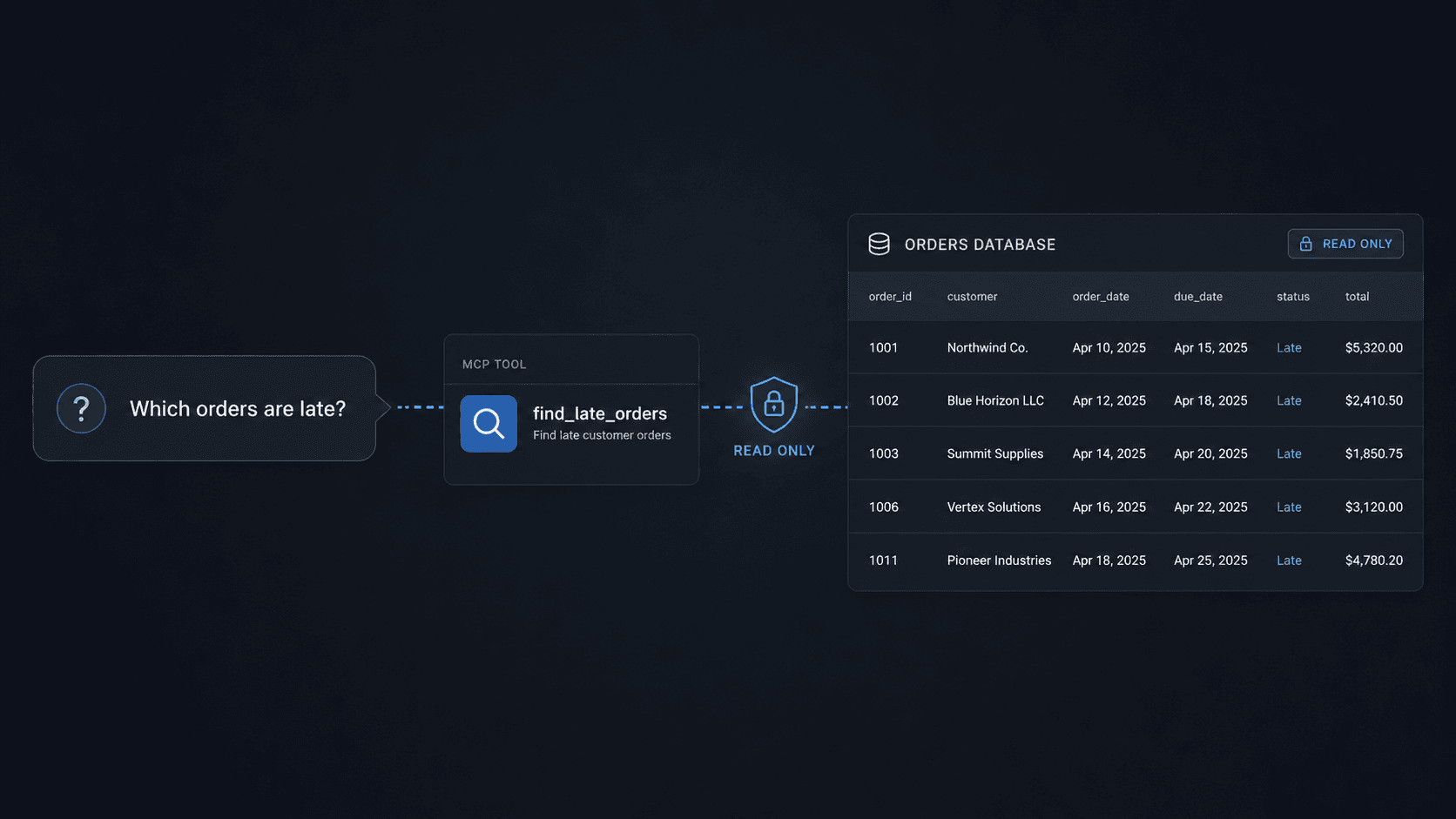
Write the Tool Once: How MCP Connects Claude to Your Database
You can connect Claude to your own database in an afternoon.
That does not mean giving a model unrestricted access to production. It means exposing one narrow, controlled function that the model can discover and call when it needs an answer.
I do this for clients. The part that surprised me was not how long it took. It was how little I had to write.
Imagine you have a table of customer orders. You want to ask a simple question in plain English:
Which orders are late today?
You do not need to teach Claude your database syntax. You do not need a long prompt explaining every column. You define a tool called find_late_orders, describe what it does, specify the input it accepts, and connect it to the database.
Claude can then find that tool, call it, inspect the result, and use the answer in the conversation.
The format that makes this possible is the Model Context Protocol, or MCP.
What MCP actually does
MCP is an open standard for connecting AI applications to external tools, data, and workflows. An MCP server can expose three main things:
- Tools that perform work, such as finding late orders.
- Resources that provide data, such as a policy document.
- Prompts that provide reusable interaction templates.
For this example, we only need one tool.
The tool definition tells the AI host:
- Its name.
- What it does.
- Which inputs it accepts.
- What it returns.
The model does not receive your database password. It does not need direct database access. It sees a controlled interface and decides when that interface is useful.
Build the first version
Assume the database has an orders table with these columns:
idcustomer_namepromised_datedelivered_at
Install the official Python MCP SDK:
uv add "mcp[cli]"
Create a file named server.py:
from datetime import date
import sqlite3
from mcp.server import MCPServer
mcp = MCPServer("orders")
@mcp.tool()
def find_late_orders(as_of: str) -> list[dict]:
"""Return undelivered orders promised before the given ISO date."""
cutoff = date.fromisoformat(as_of).isoformat()
with sqlite3.connect("orders.db") as connection:
connection.row_factory = sqlite3.Row
rows = connection.execute(
""" SELECT id, customer_name, promised_date FROM orders WHERE delivered_at IS NULL AND promised_date < ? ORDER BY promised_date ASC LIMIT 100 """,
(cutoff,),
).fetchall()
return [dict(row) for row in rows]
Then inspect the server locally:
uv run mcp dev server.py
The SDK reads the function name, type hint, and docstring. It turns them into a tool definition the model can understand. You do not need to hand-write the protocol messages or the input schema.
This example uses SQLite to keep the code easy to read. The same pattern works with PostgreSQL, MySQL, a warehouse, or an internal API.
What happens when someone asks a question
Once the MCP server is connected to a compatible AI host, the flow looks like this:
- A user asks, "Which orders are late as of 2026-08-30?"
- The host shows the model that
find_late_ordersis available. - The model chooses the tool and supplies
2026-08-30as the input. - The host requests approval if its policy requires it.
- The MCP server runs the fixed, parameterized query.
- The database returns no more than 100 matching rows.
- The model summarizes the result for the user.
That is the useful part. You describe the capability once, and the model can work out when to call it.
Why the same tool can work beyond Claude
MCP began at Anthropic, but it is no longer limited to one company. It now sits under the Linux Foundation's Agentic AI Foundation. The foundation has backing from AWS, Anthropic, Google, Microsoft, OpenAI, and other members.
That shared standard creates a practical advantage: you can build one MCP server and connect it to different compatible hosts.
There is an important limit to that promise. "Write once" does not mean "works everywhere with no setup."
Each host still needs to support the relevant MCP transport and protocol version. Authentication, approvals, secrets, and deployment settings can also differ. The reusable part is the tool contract and the server logic.
Keep the description model-neutral. Instead of writing, "Use this when Claude needs order data," write, "Return undelivered orders promised before the requested date."
That small choice makes the tool easier to move.
The afternoon version is not the production version
A local proof of concept can be small. A production connection needs boundaries.
The biggest mistake is exposing a generic tool such as this:
run_sql(query)
That gives the model too much freedom. It can generate an expensive query, request sensitive columns, or change data if the database role allows it.
Expose business actions instead:
find_late_orders(as_of)
get_order_status(order_id)
list_failed_payments(start_date, end_date)
Each tool should have a narrow purpose, validated inputs, and a predictable result.
A production-safe setup
Use this sequence before the tool touches live business data.
1. Start with a read-only data source
Use a database account that cannot insert, update, or delete records. If possible, point the tool at a read replica or a reporting API instead of the primary production database.
The server should only receive the permissions its tools require.
2. Use fixed, parameterized queries
Do not pass model-written SQL directly to the database. Keep the SQL in your server and pass only validated values into placeholders.
The example above accepts a date. It does not accept a query.
3. Validate every input
Check dates, identifiers, ranges, and allowed values before querying anything. Reject invalid requests clearly.
If a tool accepts a date range, set a maximum range. If it accepts an order ID, confirm that the ID matches the expected format.
4. Limit the output
Set a row limit. Remove columns the model does not need. Do not return payment details, private notes, access tokens, or personal information just because the table contains them.
The model should receive the minimum data needed to answer the question.
5. Separate reading from writing
Do not combine lookup and mutation into one tool.
For example:
get_order_statuscan be read-only.cancel_orderchanges customer data and needs stronger controls.
Any tool that changes data, sends a message, moves money, or affects another person should require explicit approval.
6. Add timeouts and rate limits
A valid request can still be expensive. Apply query timeouts, connection limits, per-user limits, and per-tool rate limits.
Also decide what happens when the database is slow. The tool should fail clearly instead of retrying forever.
7. Log every tool call
Record enough information to investigate a problem:
- User or service identity.
- Tool name.
- Validated arguments, with sensitive fields removed or hashed.
- Start time and duration.
- Result count.
- Success or failure.
- Approval decision for high-impact actions.
Do not log secrets or full sensitive records.
8. Test failure paths
Test more than the happy path. Try:
- An invalid date.
- A date range that is too large.
- A user without permission.
- A database timeout.
- An empty result.
- More rows than the output limit.
- A request for a field the tool should never return.
The production test is not only, "Can the model call the tool?" It is also, "Can the tool refuse safely?"
A simple architecture that scales
For a first client project, I would use this path:
User question
-> AI host
-> MCP tool
-> authorization and validation
-> read-only database or internal API
-> filtered result
-> AI host
-> user
The AI is not the security boundary. Your server is.
That server decides what is available, who can call it, which records they can see, how much data can leave, and which actions need approval.
Your release checklist
Before connecting an MCP tool to live data, confirm all of these:
- [ ] The tool has one narrow business purpose.
- [ ] The database account uses minimum permissions.
- [ ] The model cannot submit arbitrary SQL.
- [ ] All inputs are validated.
- [ ] Queries have timeouts and row limits.
- [ ] Sensitive fields are removed from results.
- [ ] Users are authorized for the records they request.
- [ ] Write actions are separate from read actions.
- [ ] High-impact actions require human approval.
- [ ] Calls, failures, and approvals are logged.
- [ ] Secrets live outside the source code.
- [ ] Rate limits and a kill switch are in place.
- [ ] Failure and abuse cases have been tested.
The real advantage
MCP does not remove the engineering. It removes repeated integration work.
You define a useful capability once. You give it a clear name, typed inputs, a safe implementation, and strict permissions. Compatible AI hosts can then discover and call it without a custom prompt for every model.
The first file may only take an afternoon.
The controls around that file are what make it ready for a business.
Sources
Stay ahead of the curve
Join my private newsletter for exclusive insights, tools, and thoughts straight to your inbox. No spam, just value.